
hi yall... now trying to revive a not so passionate free time waster of mine 😀 |
| good bye ole fren.. ya no more usefool to moi |
09 Ogos 2018
bye bye old bloggg...


02 Ogos 2011
omg… it went south to heaven (for a short while)
well, you really don’t wanna this to happen to you. but it did happen to moi, the so-called self proclaimed crusader of data and infomation backup bar none hehehe 
happened last week, on the unholy day of Thurs… it was gone, yadaaaa, went to heaven, kicked da bucket, bit the dust, went south… in short = GONE, wooohoooo…felt like crying, but the more I thot ‘bout it (the crying…) the more idiotic it seemed… time flew by in a flash anyway, cry or not… until the realization sets in, it was really GONE! 
the next few days were a do-or-die mission to try to get back data, at all cost (with minimal cost) if you get the drift… I know I know I’m a cheapskate… well, how can I not be one, lotsa appz I use r of the carribean type ones, last time using cds, now more spohisticated downloading directly from the net,,, a healthy diet of carribean type stuff won’t satisfy your hunger for more… it’s addictive I tell ya. the withdrawal symptoms could probably be more acute than, say compared to a smoker’s… so staying status quo is the best option… hence the minimalist cost at all cost… ok ok go ahead and laugh heartily… ada aku kesah?

a list of things todo simmering in my mind :-
1) don’t save files or create new partitions in that disk, you’ll make things worse trust me
2) get a partition recovery software, preferably one that is self booting. in fact buy a genuine one, so that you can sleep soundly later at nite should you recover the data. if nothing else, borrow a genuine one

3) use it to recover the deleted partition, run a skindeepshit scan or superficialscan or down-to-earth scan or wat not to really analyze the disk content to your heart
4) recover the deleted partition to a harddisk, portable or not, take your pick
5) recreate new partition in the harddisk, install OS of your choice
6) restore the folders & files to your new partitions… voila
On paper, it all sounds delicious… just wait until you need to do this yourselves 
will continue later wif more juicy details

26 Julai 2011
dell malaysia instant rebate anyone?
hi yall… just’d like to share wif ya ‘bout some lcd monitor thingy for my kids I bought last night from dell malaysia… seemed like a really good deal tho, but not without some share of trials and tribulations

well, anyhoo… here’s the original price, which I’ve searched similar sites eg: navotech, pcspec (well at least those in melaka anyway…) and found out the this is roughly at least 50 clams more than the current pricing for a 20” lcd monitor wif led backlighting. not yummy at all


dig dig & dig… repeat that 1000x hehe… ok I exaggerated… anyway, well, finally, somehow, I managed to get the monitor (Dell E2011H btw… & don’t ask me how hehe… no secret doncha worry) plus an instant rebate of rm133.00… Final price rm349.00 woootttt@#%$^! 

So, am I getting a good deal OR am I getting a good deal???


cheers
n/b: the instant rebate will end on thurs. 28/july/2011 if you could find it even…

24 Jun 2011
manage hyper-v server 2008 from win7
if you need to remote manage VMs from your win7 machine, download this remote server admin tool from micro$oft, install it then use it to your heart’s content…
download it from here… http://www.microsoft.com/downloads/en/details.aspx?FamilyID=7D2F6AD7-656B-4313-A005-4E344E43997D&displaylang=en
got 2 versions i.e. 64-bit as well as 32-bit version, so choose one which is appropriate for your operating system ya
1. install the remote admin tool
2. goto control panel > program and features > turn windows features on/off, choose remote server admin tools > hyper-v tools > hyper-v manager (don’t forget to tick the tickbox)

3. run the hyper-v manager from the control panel > admin tools


4. right-click on the ‘Hyper-V Manager’ header in the left most pane, click connect to server to manage. but ooops, wait… there’s an error here duuhh?!@#$%


5. oh ok, after a few rounds wif uncle google… there’s still an honest-to-goodness solution

6. goto windows folder > system32 and locate dcomcnfg.exe utility and fire dat up… right-click and run as administrator ya

7. console root > component services > computers > my computer and right-click to go to properties.
8. locate COM Security tab, click Edit Limits, choose anonymous logins, finally tick Remote Access in the Allow column. tada….


9. open the Hyper-V manager, refresh, then you’ll see the server you want to manage… kewl

16 Jun 2011
blogging on the go using windows live writer 2011
huhu… now m using windows live writer 2011 for updating this site… look simpler than Zoundry Raven, but not as impressive imho… at least not in the features area, but then there’s the live writer plugin… duh! this blogging tool scores very well tho in the user-friendliness area. A++ in my books. anyway, ignore dat at ur peril if u’re not an ms fan, coz an ms junkie I m


download here http://explore.live.com/windows-live-writer?os=other
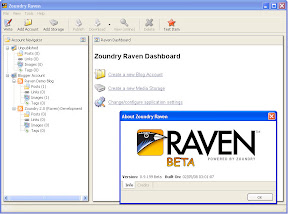
Found out this nifty proggy earlier http://www.zoundryraven.com/ for my blog updates. Good thing is u can make it into a portable app, so there u go on da go… 
Been a while updating the blog, so might be a bit rusty... l8r...

Cheers
07 Oktober 2009
26 September 2009
Enable sound in OpenSolaris under VirtualBox
Kalau tergerak hati plak nak install OpenSolaris, gi download kat sini dulu OpenSolaris 2009.06 LiveCD (x86) md5sum (osol-0906-x86.iso) = 86e19c89a30c9b91cbb096a758dea737 itupun kalau nak check ler. Err... nih sedikit sebanyak pasai livecd tuu as stated in the download page
Installation in VirtualBox is ho hum uneventful, senang takbley nak cakap w/pun a bit slow tak tau kenaper. Basically, boot livecd tuh, once dah masuk kat desktop dier baru kiter initiate Installation to harddisk. Tak susah maner pun, but that's not the point in this article...
Yg pening nyer, post installation config problem. Senang citer, audio takder i.e. no available sound device! Mmm... google saner sini baru dapat tahu yg mmg OpenSolaris ader sket hal dengan sound, even dgn configuration VirtualBox with common ICH AC97 audio controller... Salah satu link yg sangat helpful How to get Audio to work on OpenSolaris on VirtualBox
To be continued...


n/b: Tuh lar... lenkalik check dulu kat sini Solaris OS: Hardware Compatibility Lists. Jgn main hentam keromo jek, kan dah susah...
OpenSolaris 2009.06 is a single CD combined live/install image for x86: a core operating system, kernel, system libraries, a desktop environment and a package management system. Automated installer (AI) images exist for deploying on both x86 and SPARC hardware.
The contents of the OpenSolaris™ 2009.06 Live Media Images are governed by the Common Development and Distribution License Version 1.0 with the exception of certain portions under other licenses (such as the OpenSolaris Binary License) as provided in the OpenSolaris Live Media License file included with the software. The additional software available from the OpenSolaris Package Repository and not included on the Live Media Image is governed by the licenses provided in the OpenSolaris Package Repository License file and/or in the individual software packages. All of these licenses permit use, copying and redistribution of the software.
Installation in VirtualBox is ho hum uneventful, senang takbley nak cakap w/pun a bit slow tak tau kenaper. Basically, boot livecd tuh, once dah masuk kat desktop dier baru kiter initiate Installation to harddisk. Tak susah maner pun, but that's not the point in this article...
Yg pening nyer, post installation config problem. Senang citer, audio takder i.e. no available sound device! Mmm... google saner sini baru dapat tahu yg mmg OpenSolaris ader sket hal dengan sound, even dgn configuration VirtualBox with common ICH AC97 audio controller... Salah satu link yg sangat helpful How to get Audio to work on OpenSolaris on VirtualBox
To be continued...


n/b: Tuh lar... lenkalik check dulu kat sini Solaris OS: Hardware Compatibility Lists. Jgn main hentam keromo jek, kan dah susah...
Langgan:
Ulasan (Atom)

 Catatan


